

LangGraph is a graph-based framework managing decision logic, while n8n is an automation tool that makes operational workflows visible. When we reach a new layer, the question changes: can you run all of these systems without your data leaving your own infrastructure?
Ollama gives a practical answer to that question. Two commands in the terminal and large language models run on local hardware. No cloud API dependency. No data privacy risk to take on.
Where Does the Data Go?
The first question companies ask when adopting AI tools is usually not technical: “Where does what we write go?”
This question carries particular weight in sectors where GDPR or KVKK compliance is required. Teams working in law, healthcare, finance, or public sector projects may be reluctant to send client data, contract text, or internal correspondence as a prompt to a cloud API.
One solution path is data anonymization, another is enterprise API agreements. But these are temporary bridges. The real solution is running the model on your own infrastructure.
Local AI enters here. In the W18 AI Tool Map article we briefly mentioned this layer; now we look at the concrete setup.

What is Ollama?
Ollama is an open-source tool designed to run large language models in a local environment. It supports macOS, Linux, and Windows. The core design principle is simplicity: it brings model management, server startup, and the API layer together under a single CLI.
The format Ollama centers on is GGUF. This format reduces memory usage by quantizing models (lowering numerical precision). This makes it possible to run a 7 billion parameter model on consumer-level hardware: for example a GPU with 8 GB VRAM.
Architecturally, Ollama consists of two components: a model execution engine and a local REST API server. When a model is running it accepts requests on localhost:11434. This makes Ollama suitable not only for terminal use but also for integration into existing applications.
Starting with Two Commands
Installation is straightforward. A single line for macOS and Linux, an installer for Windows. After installation, pulling and running a model looks like this:
ollama pull llama3
ollama run llama3
The pull command downloads the model from the Ollama library and saves it to local storage. run starts an interactive session: you can talk directly to the model through the terminal.
The API layer runs separately. The ollama serve command starts the server and opens it to application integrations. The endpoint structure is designed to be compatible with the OpenAI API; this means the majority of existing OpenAI integrations can be redirected to Ollama with minimal changes.
Model Selection: Balancing Capacity and Hardware
Ollama’s library has dozens of models. Llama 3, Mistral, Gemma, Phi, DeepSeek are among the leading ones. But your hardware limits determine which model to choose.
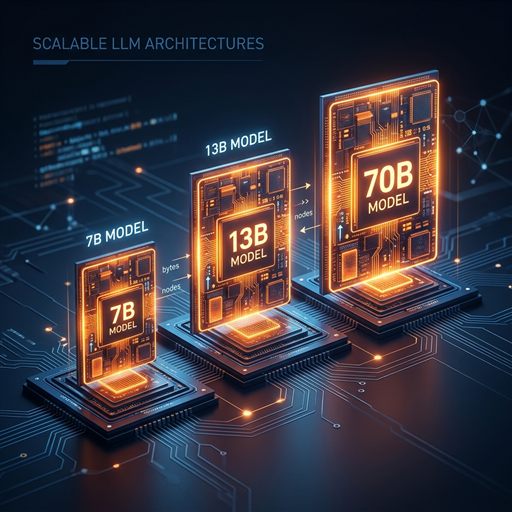
- 7B models (7 billion parameters): work with 8 GB VRAM. This means you can run on a mid-range gaming card. For task-focused use: code explanation, text summarization, internal Q&A; 7B models meet expectations.
- 13B models: require 16 GB VRAM. They offer a longer context window and more accurate outputs. For multi-step tasks or technical document analysis, 13B is worth considering.
- 70B models: require a powerful GPU or multiple GPUs; not realistic on consumer hardware. This range is for those considering on-premise server setups or dedicated hardware.
- CPU usage: You can also run on CPU but speed drops significantly. GPU is essential for production; CPU is sufficient for development and prototyping.
Interface with AnythingLLM
The terminal is flexible enough, but not every user comes with CLI expectations. AnythingLLM fills this gap: a visual interface that talks to Ollama.
It installs as a desktop application. After pointing the backend to Ollama, document upload, chat history, and multiple workspace features become available. It is possible to load company knowledge bases, technical documentation, or internal policy documents into this interface and query them over the local model.
The RAG (Retrieval-Augmented Generation) flow also stays internal: AnythingLLM vectorizes documents, stores embeddings locally, and passes relevant sections to the model. This way neither company data touches the cloud nor a third-party API.
The only requirement for setup: Ollama must be running in serve mode.
Alternatives: Not Just Ollama
The local AI category is growing and Ollama is not the only option. These alternatives fit different usage scenarios.
- vLLM: is designed for high throughput and concurrent request capacity. It stands out in scenarios that need to serve multiple clients in a production environment rather than a single user. It requires Linux and powerful GPU infrastructure; setup is more complex than Ollama but scaling capacity is much higher.
- LM Studio: offers the closest user experience to Ollama among the alternatives. It runs as a desktop application, model downloading and management can be done from a visual interface. More accessible for non-technical users or team members not comfortable with the CLI. However the API layer for production environment integration is not as mature as Ollama.
- Groq: is not local; but it is a critical alternative. Groq runs open models on the cloud on its own hardware (LPU architecture). Response speed is exceptional; it generates hundreds of tokens per second on 7B models. If you have no data privacy problem but low latency is the priority, Groq is a sensible choice. Its free tier is sufficient for prototyping.
- AnythingLLM: adds a GUI and RAG layer on top of Ollama; it should be considered an integration tool, not a standalone model runner.
The selection criterion starts with this question: does your data need to stay on-premise? If yes: Ollama or vLLM. If speed is the priority and data sensitivity is manageable: Groq. If you want to include non-technical users: LM Studio or AnythingLLM.

Things to Consider for Production Environments
Ollama is strong for local development; but before moving to a production environment, a few topics should be clarified.
Model updates do not come automatically. The ollama pull command needs to be re-run; this means establishing an update management routine. In large organizations this step can be overlooked and lead to models remaining on older versions.
Storage space should also be factored in. 7B models take up approximately 4-5 GB in quantized format; 13B models 8-10 GB. If you want to keep multiple models on a local system, you need to set aside sufficient disk space. Models download to the user directory by default; this location can be customized in enterprise deployments.
Multi-user scenarios are another consideration. When Ollama runs in serve mode, it processes multiple requests sequentially. Concurrency is limited; vLLM is more suitable for parallel load.
The security layer is not a natural part of Ollama. The localhost:11434 endpoint is open by default. If deploying on a corporate network, a reverse proxy (nginx or Caddy) and an authentication layer need to be added.
None of these limitations make Ollama a bad choice; it is simply important to clarify what you expect in which scenario. Fast and reliable for development and prototyping. Sufficient for small-scale internal tools. For large-scale production it needs to be supported by vLLM or managed services.
Connection to the Series
- LangGraph: manages decision logic: it defines which action happens at which step in a graph. Some of those decisions depend on model output: for example, classify a document, route based on the result. These model calls can be directed to a local Ollama model. Without a cloud API call. Without data going out.
- n8n: The same applies on the n8n side. If a model call is needed in a workflow step, Ollama’s local API can be the backend of that step. Pointing n8n’s HTTP request node to
localhost:11434/api/generateis sufficient. - Agent IDEs: On the agent IDE side, Cursor or Codex run cloud-based; redirecting these to a local model requires additional configuration and the experience is not yet mature. Knowing this limitation is important for positioning the tools correctly.
Direction
To briefly frame what we have learned in the series: LangGraph provides visibility and control, n8n provides operational speed, agent IDEs provide code generation, Ollama provides data sovereignty. The four layers complement each other; which one comes into play when depends on the project context.
In the general summary of our AI Stack series, we evaluate all these layers together to answer the question “what did we use where?”
For those who want to experience local AI setup, Ollama’s official documentation and starting with Llama 3 is a good entry point. For AnythingLLM setup, the project’s own guide is comprehensive. Both tools are in active development; new model support and performance improvements are arriving regularly.
FAQ
Do I need programming knowledge to set up Ollama?
Basic terminal knowledge is sufficient. There is a single-line installation script for macOS and Linux; a visual installer for Windows. After installation you can get started with ollama pull llama3 and ollama run llama3. No coding required.
What hardware is required?
8 GB VRAM is sufficient for 7B models; works with a mid-range gaming card. 16 GB VRAM for 13B, powerful server hardware for 70B and above. It also runs on CPU but speed is low; acceptable for development purposes.
What is the key difference between Ollama and Groq?
Ollama runs entirely locally; your data does not leave your system. Groq is cloud-based but exceptionally fast. If data privacy is your primary constraint, Ollama is the right choice. If speed is the priority and data sensitivity is manageable, Groq is worth considering.
Can Ollama be used in production?
It is used in small-scale internal tools. However for large-scale and high-concurrency environments, vLLM is more appropriate. For production use of Ollama, a reverse proxy, authentication, and update management plan should be in place.
Is AnythingLLM required?
No. Ollama can be used directly via terminal or through the API. AnythingLLM is an added layer for non-technical users or document-based querying (RAG) needs. For developer-focused use, the terminal or direct API integration is sufficient.
AI Stack Guide series. Previous posts: LangGraph, n8n, Agent IDEs.


Make a Comment