

Throughout 2025, Cursor was the most downloaded developer tool. During the same period, the vast majority of agentic systems deployed to production were built on LangGraph. Both of these facts are true at the same time - but they belong to different categories. The 2026 AI stack can no longer be described by a single tool.
Everyone faces similar questions every week: How will we keep up with all the new releases? Should we switch to this new tool?
Will it be more efficient, or cheaper? In this guide, we will examine the rapidly evolving AI tools under five categories and share Aforsoft's preferences in each.
The Real Question Is Not "Which Tool?"
The real question is: which tool for which scenario?
Without clarifying this sequence, making architectural decisions becomes really difficult. The risk is even greater now when there are dozens of competitive options across five different categories in the market.
An IDE, framework, workflow tool, autonomous agent system, and model infrastructure belong to different decision moments. Substituting one for another won't lock the project immediately - but it will increase maintenance costs over time. For more information on this topic, you can check out our article Generative AI in Coding: The Illusion of Speed vs. Architectural Integrity.
Every Tool Belongs to a Different Decision Moment
This is exactly where most teams lack not a tool, but a map. IDEs are for speed, frameworks for autonomous flows, low-code for integration, autonomous agent systems for long-term automation. Model infrastructure is the foundation upon which all these categories operate.
Proceeding without seeing this category distinction isn't necessarily wrong - but it can be much more costly than proceeding with a complete map. You can find detailed analysis about the architectural fragilities created by the illusion of speed in our article AI in Software Development Processes: A Productivity Tool or a Decision Lock?.
If context remains in an editor in one place, in an n8n flow in another, and in a Python script elsewhere; the resulting structure can be functional but fragile. We also covered this in our content We Don't Write Code Anymore - We Review It: Software Development in the AI Era.
Rapidly Evolving AI Tools Recently: Five Main Categories
To make the right choice, it is necessary to fully understand the fundamental differences the tools offer. This distinction determines not only which button you will press, but also the long-term maintenance cost of the project.
Here are the main stops of the 2026 AI Stack map:
1. Agent IDE & CLI Tools
These tools are designed for developer-focused work. They keep the context within the editor and increase speed.
Antigravity (Google), Codex (OpenAI), and GitHub Copilot Workspace stand out with their "agent-first" architecture. With a dual Manager and Editor interface capable of managing multiple autonomous agents simultaneously, they allow you to leave complex, end-to-end tasks entirely to AI.
Copilot Workspace can take a task with an "Issue-to-PR" flow, autonomously edit and test all files, and deliver it to you as a ready Pull Request. Codex is no longer just an API; it has become a full-fledged engineering platform with its desktop application and IDE plugins.
While Claude Desktop brings agentic workflows directly to the desktop with its new "Cowork" and "Code" tabs, Claude Code strengthens the CLI-based agent experience with its terminal-based structure. Cursor and GitHub Copilot (Plugin) continue to be the industry reference for AI-native development experience and daily speed.
At Aforsoft, we use Antigravity for individual development speed and autonomous task management. Apart from token quotas running out inconsistently fast lately, it works quite smoothly within the rules we have set.
A more detailed article about Agents and IDEs will be on our blog soon.
2. Low-Code & Workflow Automations
This is the solution for teams with limited technical knowledge or scenarios requiring rapid integration. They allow connecting agents through visual interfaces.
n8n is the choice of developer teams requiring data sovereignty with its open-source and self-hostable structure. Its LangChain integration also allows building smart agent workflows. Make offers a balanced middle ground for visually complex logic and parallel processing. Zapier, on the other hand, produces rapid solutions for non-technical teams with over 8,000 integrations; however, it can become costly at scale.
At Aforsoft, to keep workflows flexible at the code level, we prefer to use LangGraph structures in this category as well. In operations involving non-technical teams, Make steps in.
3. Agentic Frameworks
If you want to build fully autonomous or complex multi-agent systems, this category is for you.
LangGraph has become the industry standard for live systems with its graph-based state machine structure. It is unrivaled for scenarios requiring deterministic flow control, error management, and human-in-the-loop approval. AG2 (AutoGen) is preferred for exploratory and research-based systems with conversation-focused multi-agent interactions. CrewAI is a practical option for rapid prototyping and defined task distribution with its role-based autonomous crew structure. BeeAI (IBM) acts as a meta-orchestration category connecting agents written in different frameworks with its proprietary ACP protocol.
In live systems, our preference is LangGraph, and to orchestrate agents coming from different frameworks, it is BeeAI.
4. Autonomous & Persistent Agent Systems
Hermes (Nous Research) and Copilot Workspace are the strongest players in the autonomous category. Hermes is a self-learning autonomous agent system with persistent memory across sessions. It is not a framework or an IDE; it is an assistant infrastructure that optimizes repetitive workflows over time, integrating with more than 15 platforms from Telegram to Slack. Copilot Workspace, with its cloud-based autonomous agents, can continue working on an Issue you provided and return the result even when your computer is off.
5. Local Processing & Model Infrastructure
To be able to produce, all these tools require either a cloud API or a locally running model. This choice is not only technical; it is also a strategic decision in terms of cost, privacy, and data sovereignty.
5A. Local Inference Tools
Ollama is no longer just a local tool - this comes as a surprise to most developers. With an approach of "Start locally, move to the cloud when needed," it offers a free cloud category; providing access to datacenter hardware in US, European, and Singapore data centers. For local operation, a model with a minimum of 7 billion parameters and 8 GB VRAM is sufficient. vLLM is the preferred production-ready server for high-throughput local inference at enterprise scale; it easily migrates existing applications with its OpenAI API-compatible structure. AnythingLLM brings together a vector database, RAG pipeline, and local inference under one roof. LM Studio, with its GUI-based interface, serves as a starting point for model comparisons and non-technical users.
5B. Cloud LLM Providers: Decision Axes
Which cloud provider you choose depends on the project's priorities:
Agentic Coding and Multi-File Editing: OpenAI GPT-5.5 (April 2026) is the reference model for agentic workflows and multi-file architectural changes. It is the most mature infrastructure with its broad ecosystem, function calling, and batch API support.
Software Engineering and Tool Orchestration: Anthropic Claude Opus 4.7 is at the peak in SWE-bench pro and complex toolchain setups. It provides cost optimization with its 1 million token context window and prompt caching.
Multimodal and Real-Time Applications: Google Gemini 3.1 Pro and Flash distinguish themselves in multimodal tasks, including audio, video, and text processing, and real-time Live modes. They offer the advantage of deep integration with Vertex AI and Antigravity.
Low Latency and High Throughput: Groq offers the industry's lowest latency infrastructure with its custom LPU hardware. It is critical for real-time agent applications and voice bots. It runs Llama 4 and Mixtral models on LPUs.
Open Source and Self-Hosted: Meta Llama 4 (Scout and Maverick) is a strong alternative for fine-tuning and self-hosted deployments with its open-weights Mixture-of-Experts architecture. Mistral AI is the choice for scenarios requiring GDPR compliance and European data sovereignty; it offers both open and commercial models with Mistral Large 3.
Speed-Focused Development: xAI Grok 4.20 offers rapid iteration cycles and multi-agent API support while continuing to grow within SpaceX.
Enterprise Compliance: Azure OpenAI offers GPT-5.5 on Microsoft infrastructure while providing enterprise security SLAs, private endpoints, and integration into the existing Azure ecosystem. IBM watsonx is preferred for a hybrid cloud strategy with Granite and Llama-based models meeting HIPAA and SOC2 requirements. Together AI stands out with its voice agent infrastructure while offering more than 100 open-source models via API at a low cost.
Hardware note: For local models, 7B parameters ≈ 8 GB VRAM; for 13-14B, 16 GB is recommended. As Aforsoft, depending on the project, we prefer local Ollama (and Ollama Cloud) models, and where speed is required, the Groq infrastructure.
It's Not a Tool Problem, It's a Category Problem
When a project gets stuck or the generated code fails to meet expectations, the blame is usually placed on the "inadequacy" of the tool. Yet most of the time, the problem is not the tool, but the category in which it is used.
Asking Cursor to manage an architecture of hundreds of files at once goes beyond the expectations, not the tool.
Trying to build complex agent logic requiring state management via n8n means using a workflow tool in the framework category. To break this cycle, you can review our guide Common Misconceptions in Software Projects.
2026 AI Decision Tree: Which Tool Should You Choose?
To break free from tool clutter, you can follow the decision flow below.
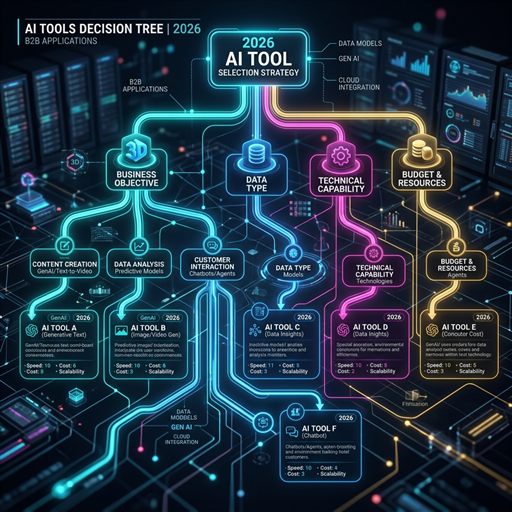
Visual Decision Map
graph TD
    Start((START)) --> Q1{Is it coding / IDE <br>focused?}

    Q1 -- Yes --> IDE[Antigravity, Cursor, Codex,<br>Copilot, Claude Desktop]

    Q1 -- No --> Q3{Is it connecting <br>APIs / Workflows?}

    Q3 -- Yes --> Q4{Is there a <br>technical team?}
    Q4 -- Yes --> n8n[n8n]
    Q4 -- No --> Make[Make / Zapier]

    Q3 -- No --> Q5{Is it an <br>autonomous agent?}
    Q5 -- Yes --> Q6{Will it go <br>to production?}
    Q6 -- Yes --> LangGraph[LangGraph]
    Q6 -- No --> CrewAI[CrewAI / AG2]

    Q3 -- No --> Q7{Is it Privacy / <br>Local processing?}
    Q7 -- Yes --> Ollama[Ollama / AnythingLLM]
    Q7 -- No --> Cloud[Cloud LLMs: GPT-5.5 / Claude]
Step-by-Step Selection Guide (Yes / No)
1. Question: Do you want to speed up the coding process or manage the project with AI? - Yes: Antigravity, Cursor, Codex, Claude Desktop, or Copilot. (Aforsoft preference: Antigravity) - No: Proceed to question 2.
2. Question: Are you building a workflow that connects different applications and APIs? - Yes: LangGraph for a flexible and code-based solution, Make for a visual/no-code solution. (Aforsoft preference: LangGraph) - No: Proceed to question 3.
3. Question: Are you dreaming of an autonomous system capable of making decisions on its own? - Yes: (Requires coding knowledge, offers the highest flexibility). LangGraph for live systems, BeeAI to orchestrate different agents. (Aforsoft preference: LangGraph / BeeAI) - No: Proceed to question 4.
4. Question: Is your top priority data privacy or low latency? - Yes: Ollama for local models, Groq providers for high speed and Groq infrastructure. (Aforsoft preference: Ollama / Groq) - No: GPT-5.5 for maximum performance, Claude Opus 4.7 for orchestration. The best stack is not the one containing the most tools; it is the one most suited to the project's technical debt limits and the team's competency.
The 14 strategic tips in our AI Productivity Master Guide: 14 Tips content also provide a practical framework to support these decision processes.
In the next step, we will lay all the technical details on the table regarding the process of setting up a production-ready agent from scratch with LangGraph, one of the most critical stops on this map. If you're ready, let's continue building together.
FAQ (Frequently Asked Questions)
Will choosing any tool create technical debt?
Yes, every technology choice creates a certain amount of debt. The important thing is to make this debt manageable through a conscious architectural decision and to use the tools in their correct category.
What is the safest starting point for our startup?
Starting with Cursor for low cost and high speed, and then migrating to frameworks like n8n and subsequently LangGraph or AG2 as the operational load increases is generally the healthiest path. We also apply this sequence in our projects.
What is the minimum hardware for a local model?
For a 7 billion parameter model, a minimum of 8 GB VRAM (runs on RTX 3070 or M2 Pro) is sufficient. If hardware is inadequate, it is possible to achieve the same result with Ollama's free cloud category or Groq API.
Will AI tools replace software architects?
No, on the contrary, the importance of architects is increasing. AI can generate code; however, determining which tool to use in which category and maintaining architectural integrity still requires human decision-making.



Make a Comment