

What Exactly is AI Productivity?
In the software development world, AI productivity is often oversimplified as "writing code faster." However, true productivity isn't just about generating text; it's about decomposing and managing a problem set in a way that aligns with AI's cognitive capacity. We call this Human-Agent Orchestration. In this context, AI is not a typewriter but a Technology Partner executing your instructions.

Real productivity isn't about asking AI a question and waiting for an answer. It's about conveying architectural decisions, business logic, and technical constraints through a Semantic Architecture that AI can understand. When this process is mismanaged, AI only provides speed; but this speed is like a train moving fast in the wrong direction.
Is AI a "Magic Wand"?
Many teams expect complexity to resolve itself automatically once they integrate AI into a project. However, this expectation is one of the most common methodological pitfalls limiting AI's technical potential. "Prompt Engineering" is often perceived as just writing fancy sentences; when in reality, it is the process of mapping Software Architecture and logical layering knowledge onto the AI interface.
This perspective can push teams into an 'AI produces, we fix later' mindset and the illusion of speed that follows. The result? A rapidly growing but difficult-to-audit Technical Debt structure. When you position AI as a "decision maker" rather than an automation tool, project control shifts away from technical discipline into hard-to-manage errors.
How High-Performance Teams Manage AI
Efficient teams don't leave the quality of AI outputs to chance. The following strategic approaches allow you to manage not just code generation, but the entire project lifecycle with Scalability and sustainability principles. Efficient teams focus not just on writing code, but on the evolution of code review processes.
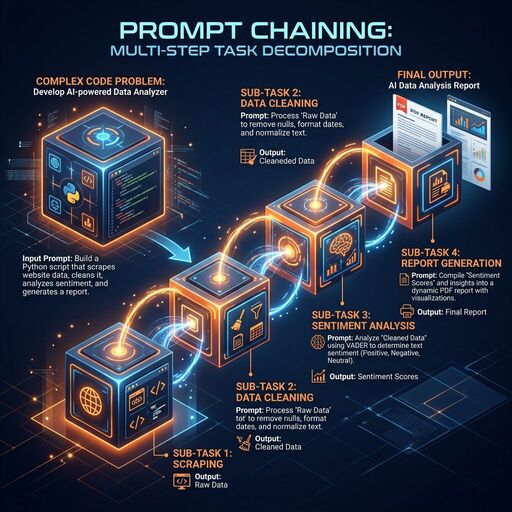
1. Step-by-Step Progress (Prompt Chaining)
Attempting to have AI do everything in a single prompt often leads to complex and erroneous results. Break complex tasks into parts.
Why is it a lifesaver?
AI attempting to solve a large problem all at once often leaves logical gaps or loses context halfway through the code. With the Prompt Chaining method, you validate the AI's output at each step and make it the foundation for the next. This minimizes the margin of error, especially in complex Enterprise Automation projects.
Enterprise Application Scenario (Python Data Pipeline)
Suppose you are preparing an SLA (Service Level Agreement) audit script. The script should pull logs from a legacy SQL database, analyze latencies, and report those exceeding a critical threshold.
❌ Wrong Approach (One-Shot):
"Write Python code that reads logs from SQL, finds latencies, reports those exceeding 5 seconds, and sends an email."
✅ Right Approach (Chaining):
- Step (Architectural Context): "First, let's write a modular
DatabaseHandlerclass that connects to the SQL database and manages connection errors (retry logic)." - Step (Data Processing): "Now, let's add a processing layer that cleans the raw data from this handler using
pandasand calculates the 'latency_ms' column." - Step (Audit & Reporting): "Finally, let's construct the function that filters latencies exceeding the 5000ms threshold and reports the results in JSON format. This approach prevents AI from becoming a decision lock in the project."
Advanced Code Example:
import pandas as pd
import logging

class SLAChecker:
    def __init__(self, raw_data):
        self.df = pd.DataFrame(raw_data)

    def process_logs(self):
        # Step 2: Precision in the data processing layer
        try:
            self.df['timestamp'] = pd.to_datetime(self.df['timestamp'])
            self.df['latency_ms'] = (pd.to_datetime(self.df['end_time']) - self.df['timestamp']).dt.total_seconds() * 1000
            return self.df
        except Exception as e:
            logging.error(f"Data processing error: {e}")
            return None

    def detect_violations(self, threshold_ms=5000):
        # Step 3: Business logic separation
        processed_df = self.process_logs()
        if processed_df is not None:
            violations = processed_df[processed_df['latency_ms'] > threshold_ms]
            return violations.to_dict(orient='records')
        return []

# Code generated with this chain is modular and each stage (DB, Analysis, Report) can be tested separately.
2. Persona Assignment (Persona Use)
When you assign a role to AI, it produces answers appropriate to that role's terminology, priorities, and technical standards.

Why is it a lifesaver?
AI's default tone is often generic and superficial. When you assign it a Senior Cloud Architect persona, it doesn't just write code; it also audits that code for Scalability, security, and Cloud-Native adherence. This prevents critical errors, especially in complex system architectures.
Enterprise Application Scenario (Architectural Review)
Suppose you want to have a database connection pool management script written.
❌ Wrong Approach (Generic):
"Write me a script that manages database connections in Python."
✅ Right Approach (Persona):
"You are a Senior Backend Architect with 20 years of experience, specializing in high-traffic systems. Review the following Python code for Performance Optimization and resource leak prevention. Focus specifically on Singleton pattern usage and connection cleanup mechanisms."3. Guidance with Examples (Few-Shot Prompting)
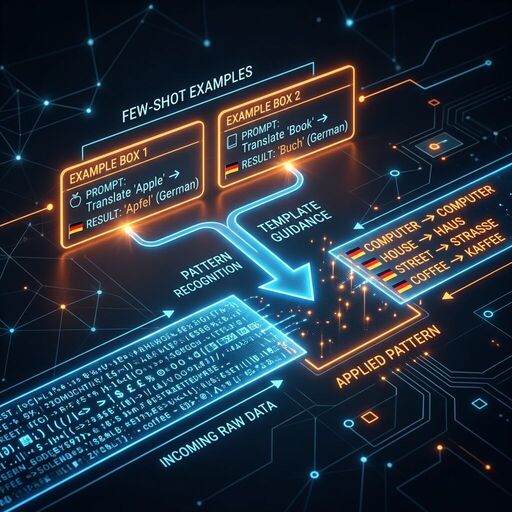
Showing 1-2 concrete examples of the output pattern you want the AI to produce increases accuracy dramatically.
Why is it a lifesaver?
Industry-specific jargon or corporate data standards may not always be in AI's training data. With Few-Shot Prompting, you give AI a "learning example"; AI can clone this pattern and process thousands of rows of data with zero errors.
Enterprise Application Scenario (Data Standardization)
Imagine you need to transform irregular user data from different legacy systems into an enterprise Pydantic model.
✅ Right Approach (With Examples):
"Transform the following raw data into this Python data model. Here are two examples: Input: 'USR-99 | A. Yilmaz | 0532...' -> Output:User(id=99, name='Ahmet Yilmaz', phone='532...')Input: 'ID:102 - Canan Su - (212)...' -> Output:User(id=102, name='Canan Su', phone='212...')Now process this data: 'User_44 / M. Kara / +90505...'"
Advanced Code Example (with Pydantic):
from pydantic import BaseModel, field_validator
import re

class User(BaseModel):
    id: int
    name: str
    phone: str

    @field_validator('phone')
    @classmethod
    def clean_phone(cls, v):
        # You can ask AI to construct this regex logic correctly with Few-Shot
        return re.sub(r'D', '', v)

# AI can automatically feed this model with legacy data thanks to your Few-Shot examples.
4. Logic Chain Construction (Chain of Thought)
By asking AI to "think step-by-step" before giving the result, you can make it notice logic errors on its own.
Why is it a lifesaver?
Modern LLMs (Large Language Models) progress by predicting the next word. If it starts writing code directly without solving a complex Software Architecture problem, it might experience a logical bottleneck halfway through. If you tell it to "construct the logic first," AI first creates a Pseudocode or flowchart; this ensures the final code is error-free.
Enterprise Application Scenario (Architectural Analysis)
Suppose you are constructing a transaction that both records to a local database and sends an API request to an external CRM system during user registration.
✅ Right Approach (Plan Request):
"We will construct the following multi-step registration process in Python. First, analyze the error cases of this process (rollback mechanism, API timeout, etc.) step-by-step. After constructing the logic, produce a clean solution using contextlib.contextmanager."Advanced Code Example (Logical Flow Result):
from contextlib import contextmanager

@contextmanager
def user_registration_transaction(user_data):
    # AI doesn't forget the rollback scenario here because it constructed the logic first
    try:
        print(f"Database registration started: {user_data['name']}")
        yield
        print("CRM API synchronization completed.")
    except Exception as e:
        print(f"Error occurred, all operations are being rolled back: {e}")
        # Rollback logic
        raise
5. Context Hygiene
Giving AI too much irrelevant information causes the "attention" mechanism to scatter and leads to erroneous results.
Why is it a lifesaver?
AI has a limited "memory" (context window). The more this window is filled with unnecessary code, old comments, or irrelevant imports, the faster AI "forgets" the actual problem it needs to solve. By keeping the context clean, you ensure AI focuses all its power on the Technical Debt cleanup at that moment.
Enterprise Application Scenario (Refactoring)
Imagine you have a massive 1000-line core_logic.py file and you only want to optimize a calculation function inside it.
❌ Wrong Approach:
Uploading the entire core_logic.py file to AI and saying "Fix this."✅ Right Approach:
"I am sharing only therequirements.txtsummary containing the project dependencies and thecalculate_interest_ratefunction withincore_logic.py. We have no business with other functions. Rewrite this function for Performance Optimization."
Result:
Instead of getting lost among thousands of irrelevant lines, AI focuses only on that function and produces a much cleaner, readable, and optimized output in seconds.
6. Explicit Constraints
Setting constraints for AI narrows the solution space and produces results that are 100% compatible with your project's technical standards.
Why is it a lifesaver?
AI usually suggests the most popular or easiest library. However, in an enterprise project, the use of certain libraries might be prohibited due to security policies or Dependency Management constraints. Telling AI what not to do prevents Library Compatibility issues by cutting off wrong directions at the start.
Enterprise Application Scenario (Lightweight Architecture Constraints)
Suppose you are writing an AWS Lambda function and you are prohibited from using an external library (e.g., numpy or scipy) to keep the package size small.
✅ Right Approach (Constrained):
"Write me a standard deviation calculation algorithm. Strictly do not usenumpyor any similar external library. Adhere only to Python 3.12 built-inmathandstatisticsmodules. Also, use ageneratorstructure for memory efficiency."
Result:
Instead of taking the easy way and writing import numpy, AI produces code that is lightweight and adheres to Sustainability principles while staying within your project's boundaries.
7. Grounding (Hallucination Control)
AI can sometimes produce libraries or methods that do not exist (Hallucination). To prevent this, you should force AI to adhere to documentation.
Why is it a lifesaver?
Software libraries are updated rapidly. AI's training data may be outdated and it might add a deprecated parameter to your code. This situation leads to critical errors during the deployment process. With Grounding techniques, you ask for "certain information" from AI.
Enterprise Application Scenario (API Version Tracking)
Suppose you want to have a middleware written in the latest version of FastAPI.
✅ Right Approach (Validation Request):
"Write this middleware according to the latestFastAPIversion standards. Verify that themiddleware("http")method you use is still valid in the current version and that the parameters match the documentation. If you have any doubt, proceed with the safest (fallback) method."
Tip: Asking AI to provide references, such as "which documentation page it took as an example," saves you from hours of debugging in the Version Tracking process.
Advanced AI Orchestration and Decision Mechanisms
So far, we have examined the basic logical layers you can apply in your individual interactions with AI. However, in a professional software project, productivity is determined not just by writing the right prompt, but by knowing how to integrate these tools into the project architecture and automation processes. Advanced orchestration takes AI beyond being an assistant and makes it one of the core decision mechanisms of the project.
AI Strategies in Different Scenarios
8. Structured Output Request
Instead of manually cleaning the raw text coming from AI, speed up your Automation processes by asking for formats that can be processed (parsed) directly in your software systems.
Why is it a lifesaver?
If you are integrating early AI into a CI/CD pipeline or a data processing flow, the response should not contain "chat." Forcing AI into a specific JSON schema or XML structure eliminates the manual copy-paste burden and reduces the margin of error to zero.
Enterprise Application Scenario (Data Mining)
Imagine you need to extract data from an invoice and transfer it to accounting software.
✅ Right Approach (JSON Mode):
"Extract invoice number, date, and total amount from the following text. Give the answer only in this JSON format, add no other explanation: {"invoice_no": str, "date": str, "total": float}. Pay strict attention to data type compliance (float)."Result:
AI gives you a clean JSON object. You can save this output directly to the database by saying json.loads(response) on the Python side or transfer it to the next Enterprise Automation step.
9. Recursive Polishing
The first output produced by AI is usually a "working" but "not best" output. Raise Code Quality standards by having it checked with a second pair of eyes.
Why is it a lifesaver?
There are thousands of ways to solve a problem in software. AI may choose the most common (and usually suboptimal) way the first time. When you tell it, "Review this again as a Performance Optimization expert," it comes up with suggestions that will lower the code's time complexity (Big O) or optimize memory consumption.
Enterprise Application Scenario (Algorithm Improvement)
Suppose you had the AI write a function that finds unique elements in a large list, and the AI used nested loops.
✅ Step 1: "Write a Python function that performs this operation."
✅ Step 2 (Optimization): "Review this as a High Performance Systems expert. Can we reduce the O(n^2) complexity to O(n)? Use set or dict structures to produce a more efficient version."
Result:
AI first establishes the working structure; in the second step, it delivers the optimized version compatible with expected professional Scalability standards.
10. Data Privacy and Security
In the corporate world, Cyber Security is the biggest barrier to AI usage. Learn to benefit from AI power without leaking your data.

Why is it a lifesaver?
Every piece of data you send to open-source or commercial AI models can potentially enter the model's training pool. Sharing customer information, API keys, or trade secrets as they are creates irreparable legal and technical risks. Data masking is vital for KVKK and GDPR compliance.
Enterprise Application Scenario (Data Anonymization)
You are going to have customer complaints analyzed, but there are names and phone numbers in the database.
✅ Right Approach (Masking):
Clean the raw data with a Python script before sending it to AI.
import re

def mask_sensitive_data(text):
    # Masking names and phones (Simple example)
    text = re.sub(r'[A-Z][a-z]+ [A-Z][a-z]+', '[NAME_SURNAME]', text)
    text = re.sub(r'd{10,11}', '[PHONE]', text)
    return text

# Send only the masked text to AI.
Tips:
- Always use placeholders like
YOUR_API_KEYinstead of real API keys. - For sensitive tasks, prefer Privacy-First models running on local servers (Llama 3, etc.).
11. Meta-Prompting (Questioning Its Own Prompt)
Make AI your own Prompt Engineering expert to get better results.
Why is it a lifesaver?
Sometimes you don't know how to explain a complex business logic to AI. Instead of giving the task directly to AI, asking "How can I best explain this task to you?" multiplies the quality of the result you receive. This method provides the possibility of fast prototyping, especially in projects at the MVP stage.
Enterprise Application Scenario (Prompt Optimization)
You want to have a complex microservice architecture designed.
✅ Right Approach (Meta-Query):
"I want to have a Python architecture designed by you. What information should you request from me to get the best result? Please prepare a professional System Prompt template for me and list the missing technical details (database choice, load balance, etc.) as a list."
Result:
AI doesn't just give you an answer; it presents the "set of questions" that will lead you to the most accurate answer. This ends misunderstandings at the very beginning of the project.
12. Temperature Awareness (Balance of Precision and Creativity)
Restricting AI's "imagination" in technical analyses and leaving it free in creative tasks is the key to efficiency.
Why is it a lifesaver?
The "Temperature" parameter in AI models determines how predictable the result will be. In mathematical calculations or code blocks requiring Determinism, AI being creative means it will make errors. On the other hand, you want AI to be more fluent and creative when writing documentation.
Enterprise Application Scenario (Precision vs. Writing)
- Case A (Precision): "Write the Python function that calculates tax rates using the financial data below. Do not add any comments, strictly adhere to technical documents." (Low Temperature effect).
- Case B (Creativity): "Prepare an engaging, witty, and fluent README file for this new API we wrote for developers." (High Temperature effect).
13. System Actions (Effective Use of Tools)
Do not forget that AI is not just a "chat bot"; it is a Technology Partner that can interact with the terminal, browser, and file system.
Why is it a lifesaver?
Ensuring that AI reaches current documentation instead of being limited to 2-3 years of training data is the secret to Agentic Workflow success. When you get an error, you can ask AI to search the internet or run pytest via terminal and analyze the results.
Enterprise Application Scenario (Troubleshooting)
✅ Right Approach (Tool-Enabled):
"I couldn't solve this strange error in the code. Please use the browser tool to search for this error message in the latest Python forums and verify the solution suggestions by running the tests.py file in the project."14. Agentic Context (Skills & General Instructions)
Modern IDEs (Cursor, Windsurf, etc.) now support instruction sets that cover the entire project.
Why is it a lifesaver?
Saying "use Python, adhere to PEP 8, add logging" every time you start a task is both a waste of time and creates Token Cost and context clutter by sending these lines in every message. Instead, you define these rules once in files like .cursorrules or .project-rules. AI starts every task with these basic principles.
Token Efficiency Tip:
Keep your "Skills" files modular. Thousands of lines of unnecessary instructions can distract AI. Only add the critical standards of that project (e.g., "All APIs must be protected with JWT").
Example Structure (.project-rules):
# Project Standards
- Architecture: Microservices (FastAPI)
- Security: Auth0 integration is mandatory.
- Database: Only SQLAlchemy ORM will be used.
Is the Problem with AI or Input Quality?
Failures experienced when working with AI are usually blamed on the model (model capabilities). Complaints such as "AI is hallucinating," "AI cannot write code," or "AI remains too superficial" are actually a Psychology of Engineering and input quality problem. When past major software failures are examined, it is seen that the problem is usually a lack of architectural discipline rather than technical capacity. When you see AI only as a tool and do not provide it with the necessary context, the result you get turns into a source of Technical Debt.
The problem is not the model's inadequacy, but the failure to correctly convey the project's technical depth and architectural constraints to the AI. AI is not a mind reader; it only produces the most logical possibility based on the Semantic Architecture given to it. If the output is bad, "input hygiene" has usually been compromised.
AI as a Professional Lever
In conclusion, AI is not a tool that magically simplifies the software development process; it is a Leverage tool that increases a professional developer's impact tenfold. Adopting these 14 tips not only as a "prompt list" but as a working discipline ensures that your project reaches its Scalability and sustainability goals.
Many teams at this point can lose time trying to manage AI orchestration alone in complex systems. However, with the right architectural setup and discipline, AI can go beyond being just an assistant and become the most strategic part of your project.
Frequently Asked Questions (FAQ)
How can we reduce token costs when working with AI?
The most effective way to reduce token cost is Modular Context management. Instead of sending the entire project in every prompt, using only relevant functions and "General Instructions" files (Tip 14) reduces costs by 60-70%. Additionally, choosing cheaper models (GPT-4o Mini, Claude Haiku) for tasks that do not require precision (documentation, etc.) is a strategic gain.
Is Prompt Engineering a waste of time?
On the contrary; taking 5 minutes at the beginning to determine a correct Persona and Constraints set prevents hours spent correcting erroneous outputs. This is a software design process.
Should we use the largest AI model for every task?
Actually, no. Large models (e.g., GPT-5) are ideal for complex architectural decisions and Semantic Architecture constructions. However, for more routine tasks like writing unit tests or documentation, small/fast models (e.g., GPT-5 Mini, Claude Haiku) are both faster and much more efficient in terms of Token Cost. Following a "Model Selection" strategy across the project optimizes budget management.




Make a Comment